Changelog
New features, improvements, and fixes every week
Nov 21 2025
Today we're launching Scope, a feature we should've built from day one.
This update makes filtering and analyzing your data much more flexible, more precise, and a lot easier to use. Especially inside the extension and when exploring the user journey!
The problem
You've always been able to filter by user attributes like mobile vs desktop or traffic source. But what about filtering sessions that hit a specific A/B test variant? Or isolating just the sessions where users rage-clicked? User segments couldn't do that: they worked at the user level, not the session level.
And in our extension?
You'd repeatedly set up the same page filters : URL patterns, data layer rules, then lose them the moment you closed the tab. While filtering on users was easy, filtering on sessions and/or pages wasn't.
The solution
Scope let you filter and save anything: users, sessions, or pages.
User Scopes(formerly User Segments): Filter by user attributes like device type, traffic channel, or any custom user property.Session Scopes: New! Filter by session properties—like A/B test variants, sessions with rage clicks, or any session-level behavior.Page Scopes: New! Define page sets once using URL patterns or data layer rules, then reuse them forever across your analysis. All these can be saved, shared, reused, with one single mental model across your entire workflow.
Why we renamed user segments?
Having "User Segments" next to "Session Scopes" felt clunky, same concept, different words.
In Air360, we strive to keep mental models simple and intuitive.
We found that Scopes is more universally understood and creates a consistent framework across users, sessions, and pages.
We prefere consistency over legacy naming.
Bonus: Cleaner extension UI
We've reorganized the UI of our extension to make it easier to understand what you're currently analyzing.
All filters now save properly and can be shared with your team.
We built Scopes because we kept hearing "I wish I could save that filter", we heard and built it!
You can learn more about Scope in the video below👇
Let us know if you have any feedback or questions!
Jun 30 2025
Hello👋
Great news for Shopify stores!⭐️ We’ve just updated our Shopify App to solve one of the biggest tracking challenges on Shopify stores: capturing events on critical pages like the checkout! Shopify has historically restricted the use of tracking pixels on high-impact pages, making it difficult to capture valuable customer behavior data.
With this release, we've introduced a new method that allows the Air360 app to:
- 🔍 Capture more customer events across your store
- 🛒 Track actions on previously restricted pages — including the checkout
This enhancement removes major blind spots in your tracking without requiring any changes to your existing setup. For checkout pages, this means that although you still can't use our On-Page Analysis (OPA), you can analyze checkout events in funnels, user journeys, and custom dashboards!
You can find out more in the video here👇
🔗 Download
Download the app from the Shopify App Store
📚 Documentation
For technical details on how this feature works, check out our Tech Documentation.
💬 Feedback
Have questions or feedback about this update or any other requests for your Shopify Store? We'd love to hear from you! Reach out to our support team🙂
May 28 2025

We are excited to share with you that a new powerful feature is now available on Air360! Meet the Snapshot Feature🙌
With the snapshot, you can now preserve and revisit previous versions of your website design.
What does Snapshots do?
With the Snapshot feature, you can:
- Effortlessly analyze any past website design.
- Instantly identify which updates positively or negatively impacted your performance.
- Quickly analyze short-lived campaigns (e.g., Mother's Day, Christmas)
Quick peak of how Snapshot works!
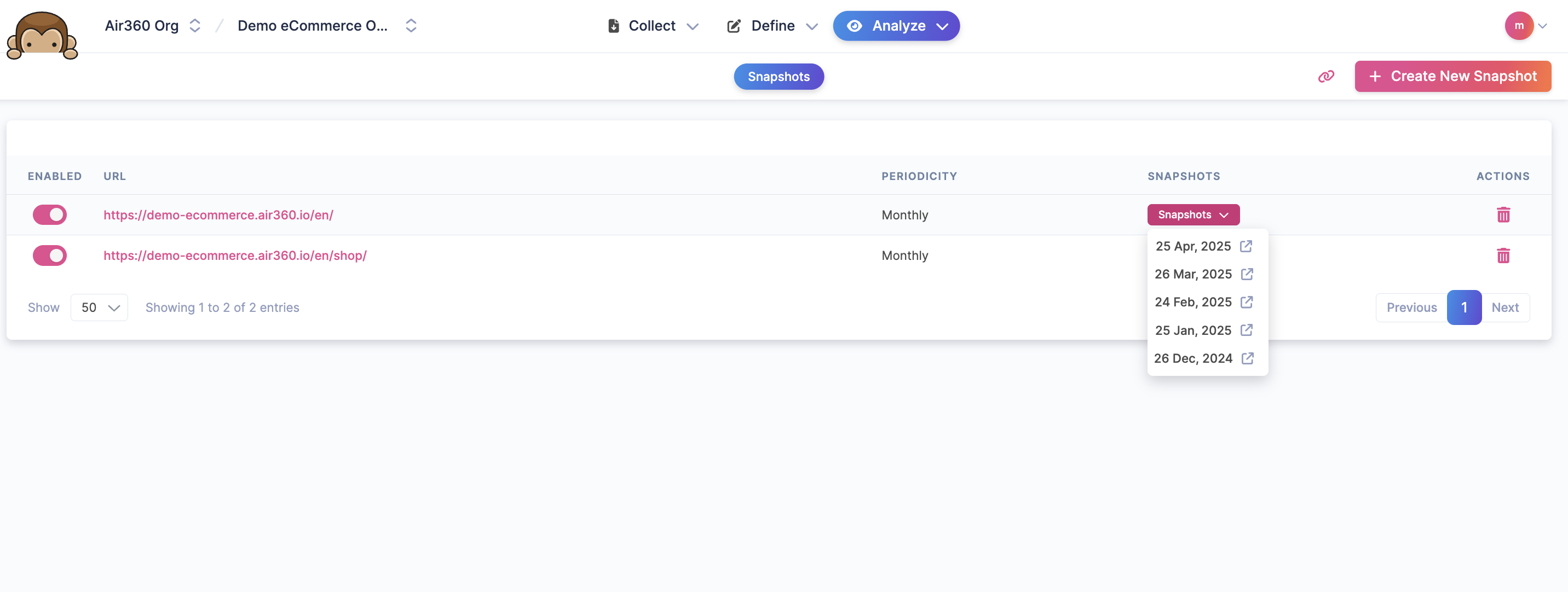 The Snapshot will not be created automatically, so you need to manually set which URL you want to save, select how often you want to save(every day? per week? per month?).
And that's basically it!
The Snapshot will not be created automatically, so you need to manually set which URL you want to save, select how often you want to save(every day? per week? per month?).
And that's basically it!
Air360 will automatically save the page design for you! And when you want to analyze past design, you simply have to select the date the design was created, and open the past design. You can open the On-page Analytics to analyze the past page! Easy right😉
Important Note: This feature is only available on cookieless Air360 tracking pixel. Make sure to update your Air360 pixel(instruction here)!
May 08 2025
Hello👋 This week we shipped several improvements to our core feature "On-page analysis (OPA)". These updates make it easier to perform detailed analysis and improve your website performance.
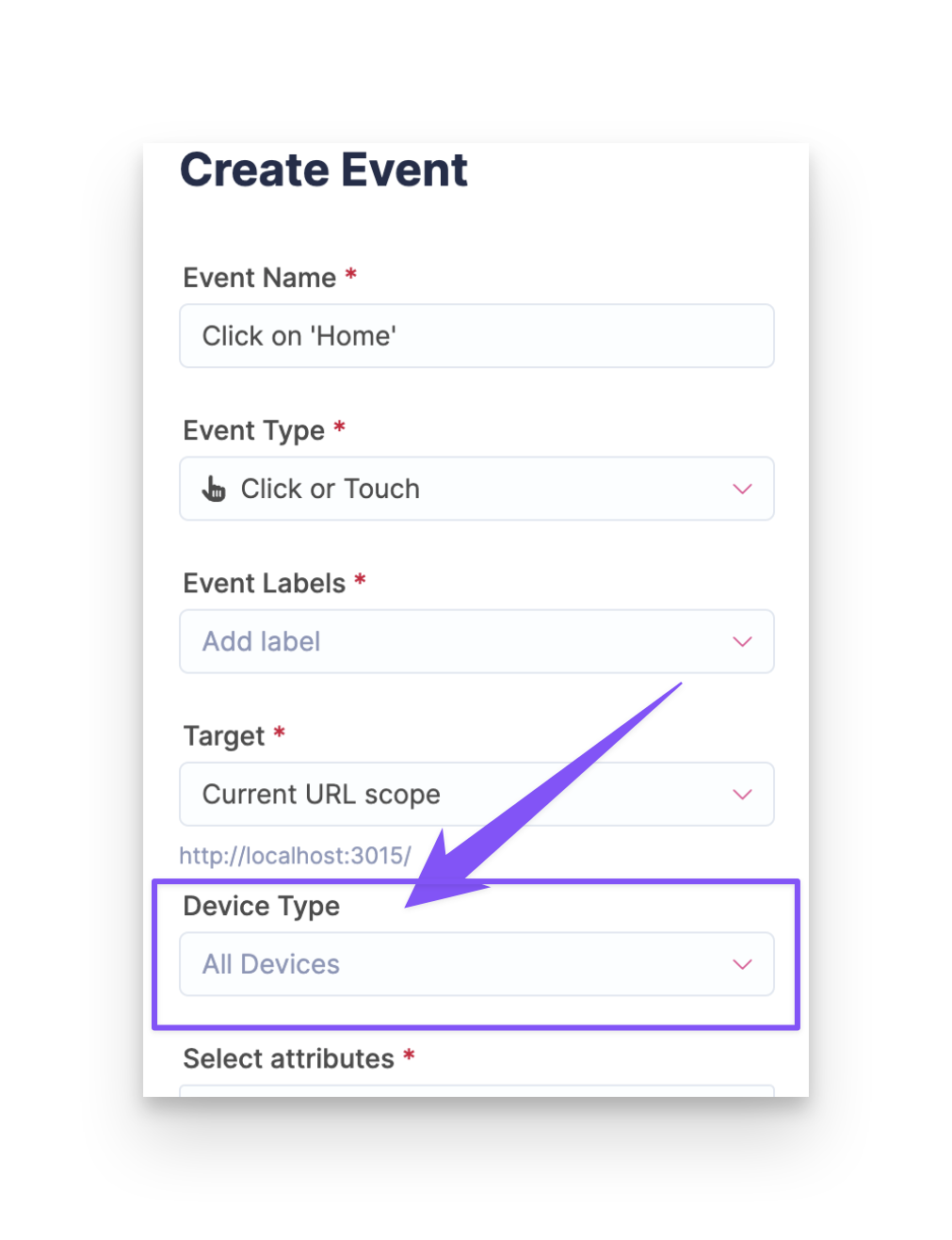
- Improved event creation : When creating an event in the OPA, you can now add the device type 📱💻
- Improved scoping in the OPA: You can now use the
datalayer, URL'squerystringorqueryhashfor more precise filtering. This update works retroactively on the data as long as the datalayer is already added to Air360😉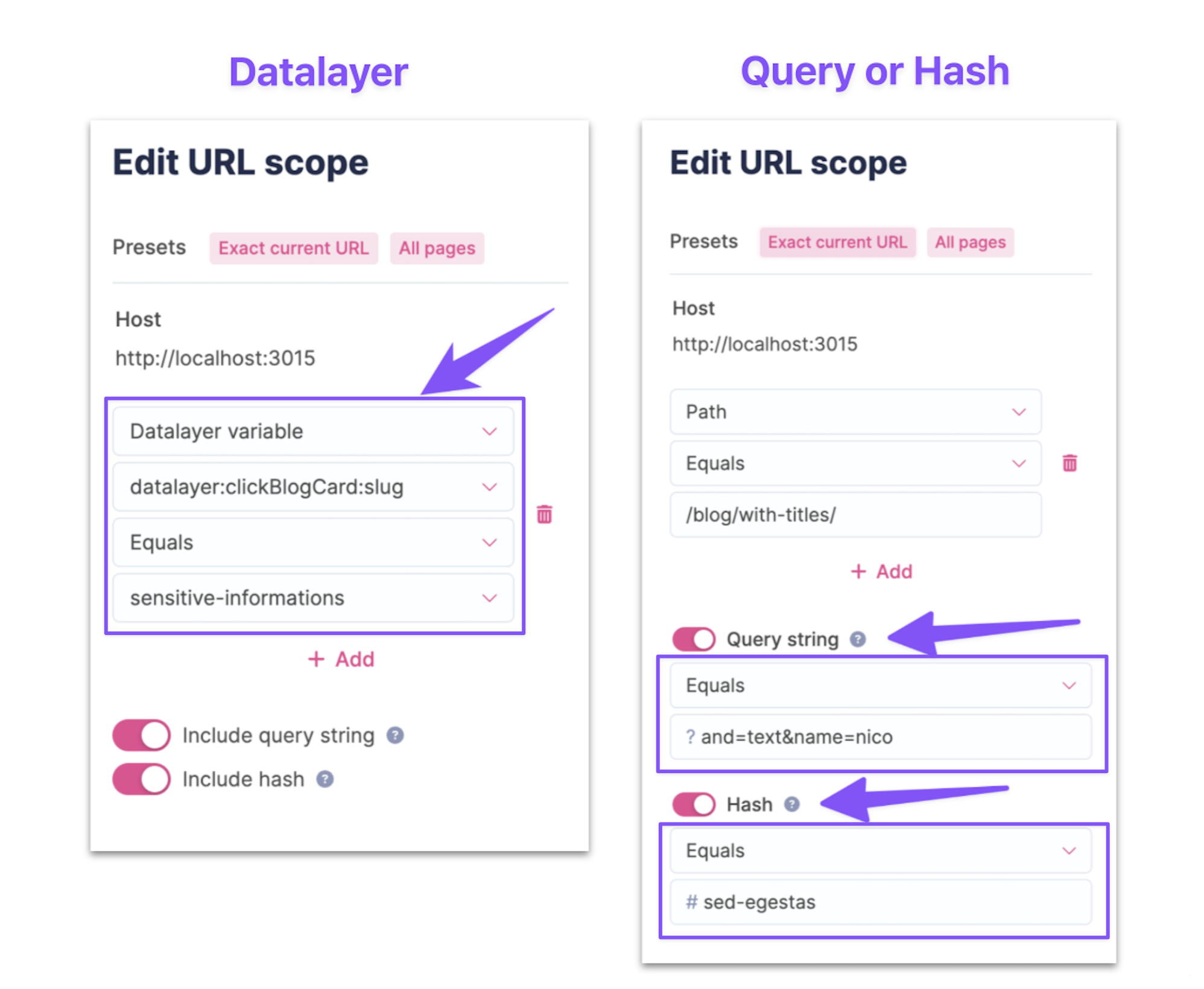
- Improved exposure rate : We have upgraded the exposure rate formula using some advanced math 🚀 This delivers more accurate readings especially for longer pages and is fully retroactive! 🎉